
Your practice,
on your desktop.
Contacts, time tracking, invoicing, and AI classification — one free desktop instrument for consultants, freelancers, and lawyers. Connect it to Claude or any AI assistant and it becomes the structured memory of your practice. No account. No cloud. No obligation.
Download Good MinutesFree for Windows and Mac. No account or credit card required.
We built what we wished existed
We build practice management software for professional firms — time recording, project management, finance, trust accounting. But we kept meeting consultants, freelancers, and sole practitioners who weren't ready for a full system. The costs, the complexity — they just wanted to do a little better. They tracked clients in spreadsheets, logged hours in their heads, and invoiced from Word templates.
We built Good Minutes for them. We took what we know large businesses need — client management, time recording, invoicing, billing compliance — and scaled it down into a single desktop download with on-device AI. What started as a time tracker turned into something more: a desktop practice instrument, simple enough for one person, powerful enough to actually help.
Built by the team behind MatterX — practice management software for Australian professional firms.
Set up in five minutes. Never think about it again.
Add your clients, carry on with your working day, then invoice from the entries it creates for you.
Add your clients and projects
Enter your contacts with company names, billing rates, and notes. Create projects and link them to clients. Good Minutes becomes your client register — everything in one place. Takes five minutes.
Carry on with your day
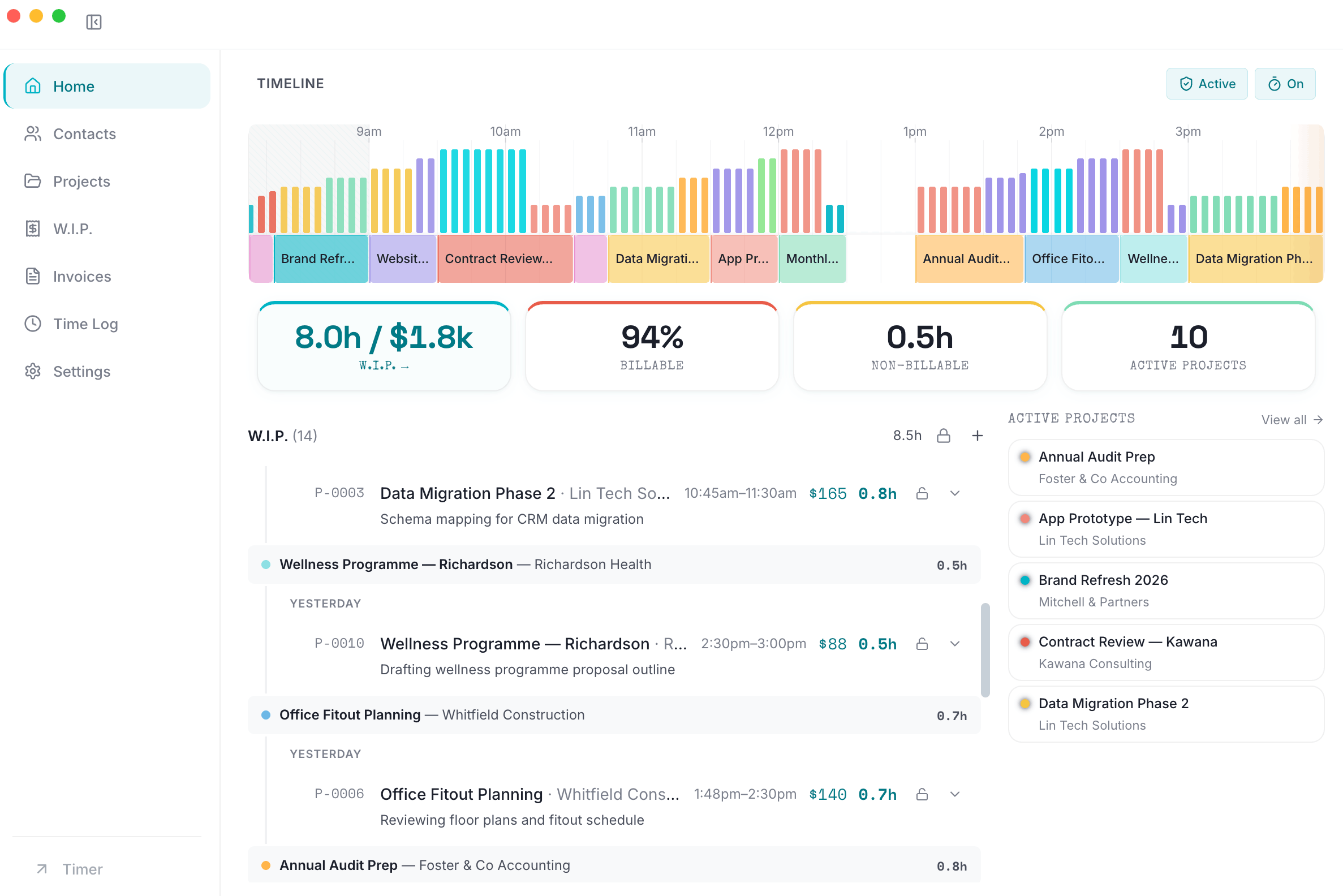
Good Minutes watches what you work on and classifies it automatically. No start/stop timers. No manual logging. It builds a living chronogram of your day — colour-coded, intensity-scored, organised by project. Your time records build themselves as you work.
Bill in thirty seconds
Review your time entries, adjust if needed, then generate an invoice with one click. PDF export for immediate delivery. LEDES format for legal billing compliance. From tracked time to sent invoice in under thirty seconds.
Watch Good Minutes in action
A three-minute walkthrough — from setup to your first invoice.
Everything the independent professional requires
Client management, invoicing, AI time tracking, and three-layer classification. One desktop instrument. No cloud dependency.
The Client Register
Your contacts with company, rate, tax, phone, and notes fields. Default billing rates cascade to projects. Link projects to contacts and see aggregate time and billing at a glance. Stop tracking clients in spreadsheets — this is the register that connects to everything else.
The Invoice Engine
Turn time entries into invoices with line items, rates, and tax. PDF export for immediate delivery. LEDES 1998BI format for legal billing compliance with corporate and insurance clients. Generate an invoice from your entries in under thirty seconds.
The Living Chronogram
A real-time, sixty-frame canvas of your working day. Colour-coded activity bars with intensity scoring, a now-needle at the leading edge, and drag-to-create entry formation. See your entire day at a glance. Scroll back seven days on the free instrument.
The Three-Layer Classifier
Layer one: keyword rules catch the obvious cases. Layer two: a 23 MB semantic cogitation unit on your machine matches activity to projects by meaning. Layer three: an optional language model writes professional billing narratives. Layers one and two are free of charge.
Passive Activity Monitoring
Good Minutes polls your active window every five seconds and builds thirty-second activity slices with a four-component intensity score. It knows the difference between active drafting and a background browser tab.
No browser extensions. Detects apps, window titles, URLs, idle periods, and input patterns — all processed locally, never uploaded.
Six-Minute Increments
Industry-standard 6-minute billing increments (1/10th hour) built in. Start times snap down, end times snap up. Also supports 10, 15, 30, and 60-minute increments.
The Cabinet & The Console
A small always-on-top floating cabinet for ambient awareness, or expand to the full console with project management, contacts, invoicing, and settings. Switch with one click or ⌘M.
Xero · MatterX · Microsoft 365
Push time entries to Xero as draft invoices. Sync contacts and matters with MatterX. Pull calendar events from Microsoft 365 as billable time. All integrations run through the Cloud Connect add-on.
The AI Station
Connect Good Minutes to Claude Desktop, Cursor, or any AI assistant — and stop doing your own data entry. Your AI suggests time entries from your activity feed, starts timers with the right project assigned, and answers questions about your clients and budgets in plain language. Twenty-two tools, one open protocol, zero configuration.
The professionals who try this do not go back to manual entry.
Let your AI assistant do the time entry
Good Minutes connects to Claude, Cursor, and any AI assistant that speaks the Model Context Protocol. Your AI reads your practice data, suggests entries from your actual activity, and answers questions about your clients and projects. No plugins. No API keys. Just connect and ask.
End-of-day time entry in 30 seconds
Tell your AI "suggest my time entries." It reads today's activity sessions — which apps you used, for how long, at what intensity — and proposes complete entries with the right project, description, and duration. You review, adjust, accept. A task that used to take fifteen minutes of memory-trawling at 5pm is done before your coffee goes cold.
Catch the hours you would have forgotten
Your AI sees your email, calendar, and documents alongside your Good Minutes data. It can match a client meeting in Outlook with unlogged time in Good Minutes — and suggest the entry you missed. Independent professionals lose 15–40% of billable time to poor tracking. This is how you stop the leak.
Ask questions, not dashboards
"What did I spend on the Henderson project this month?" "Am I over budget on the rebrand?" "When did I last speak to Sarah?" Your AI pulls time entries, notes, budget status, and contact history — then answers in plain language. Your practice data becomes a conversation, not a set of screens to click through.
Every other time tracker makes you do the data entry. Good Minutes lets your AI do it for you.
This is not a chatbot bolted onto a settings page. Good Minutes exposes 22 tools to your AI assistant — your full practice data, readable and actionable over an open protocol. Start a timer by asking. Create an entry by describing your morning. Get a project briefing without opening the app. The professionals who try this do not go back to manual entry.
Start your free trial — AI agent access includedPro includes a 14-day free trial. AI agent access works with Claude Desktop, Cursor, and any MCP-compatible assistant.
Good Minutes does not send your data to any AI provider. Your practice data stays on your machine. The AI assistant connects to Good Minutes over a local-only channel — nothing leaves your network.
Your data stays in the cabinet
Good Minutes stores everything in a local database on your machine. No cloud sync. No telemetry. No analytics on your work habits. We literally cannot see what you do. That is by design.
Local-only storage
All activity signals, time entries, contacts, invoices, and project data live in a database in your user directory. Nothing is ever uploaded to any server.
No screenshots. No keylogging.
Good Minutes reads the active window title and app name only. It never captures keystrokes, screenshots, clipboard content, or screen recordings.
Full exclusion controls
Exclude specific apps, websites, or time periods from observation. Private browsing is respected automatically. The operator decides what gets captured.
Every freelancer CRM — Bonsai, HoneyBook, Moxie, Plutio — stores your client data on their servers. Good Minutes keeps your contacts, invoices, project data, and time records on your machine. Your practice stays yours.
More capability, less cost, total privacy
Good Minutes gives you what freelancer business tools charge $17–109/month for — with AI agent access that even premium time trackers charge $16–20/month extra for.
Compared to freelancer business tools
| Feature | Good Minutes | Bonsai ($17/mo) | HoneyBook ($29–36/mo) | Moxie ($12/mo) | Spreadsheets |
|---|---|---|---|---|---|
| Client management | Pro | DIY | |||
| Time tracking | AI-powered, passive | Manual timer | Manual timer | Manual logging | |
| Invoicing | Pro (PDF + LEDES) | DIY | |||
| AI classification | 3 layers | ||||
| Desktop native | web only | web only | web only | ||
| Data stays on your machine | cloud | cloud | cloud | ||
| AI agent access (MCP) | ✓ Pro | ||||
| No account required | |||||
| Proposals & contracts | |||||
| Client portal | |||||
| Price | $0 / $10 Pro | $17–52/mo | $29–109/mo | $12–40/mo | $0 |
Good Minutes does not include proposals, contracts, or client portals. If you need those, the tools above are excellent. If you need client management, time tracking, invoicing, and privacy — Good Minutes gives you all four for free.
Compared to time trackers
| Feature | GM Free | Clockify Free | Toggl Free | Timing ($9–16/mo) | Rize ($15/mo) |
|---|---|---|---|---|---|
| Manual timers | |||||
| Passive activity capture | App names only | ||||
| Intensity scoring | |||||
| Rule-based auto-classification | |||||
| AI semantic matching | |||||
| 6-minute billing increments | |||||
| Contacts & CRM | Pro | ||||
| AI agent access (MCP) | ✓ Pro | ✓ Connect ($16) | ✓ Team ($20) | ||
| Invoicing | Pro | ||||
| Data stays local | Cloud | Cloud | Cloud | ||
| Cross-platform (Mac + Win) | Mac only | ||||
| No account required | Account needed | Account needed | Account needed | Account needed | |
| Price | $0 | $0 | $0 | $9–16/mo | $15–20/mo |
Start free. Upgrade when you are ready.
No trials to expire. No credit cards to forget. The free instrument is genuinely useful on its own. Pro adds the full billing pipeline — contacts, invoicing, and unlimited projects.
Free
- Manual timers
- Passive capture
- Chronogram
- Rule classification
- AI semantic matching
- 3 projects
- 6-min increments
- CSV export
- 90-day retention
- 7-day signal history
Pro
Billed annually at $79 USD. Save 34%.
Download FreeUpgrade to Pro inside the app when you are ready
- Everything in Free
- LLM classification
- AI narratives
- Contacts & CRM
- Invoicing + PDF + LEDES
- Custom rates
- Budgets
- Unlimited projects
- Unlimited retention
- Encrypted backups
- CSV import
- Advanced reporting
- 30-day signal history
- AI agent access — Claude, Cursor, and any MCP client
What you are purchasing: A licence to use Good Minutes desktop software (Windows and macOS). Pro is a recurring subscription that activates advanced capability within the application you have already downloaded. Cancel anytime from your account portal — your existing data and free-tier capability remain yours indefinitely. Full terms in our Terms of Service and Refund Policy. Payments processed by Lemon Squeezy, our merchant of record.
Built for professionals who run their own practice
You have been getting by with spreadsheets and notes. Good Minutes gives you a proper system — contacts, time, invoicing — without the price tag or complexity of enterprise software.
Lawyers
Matter management, time recording, LEDES billing — the three things every lawyer needs and every enterprise system overcharges for. Good Minutes gives you a client register, passive time capture with six-minute increments, and compliant invoice export in one free download.
Consultants
You track clients in a spreadsheet, log hours in your head, and invoice from a template. Good Minutes replaces all three — add your clients, carry on with your work, and your time records build themselves.
Freelancers
You do not need a $30/month cloud system with features you will never use. You need to know who your clients are, how much time you spent, and how to get paid. That is Good Minutes.
Firms & Agencies
Start with one seat. Individual licences work standalone today. Team features — shared projects, approval workflows, firm-wide reporting — are on the roadmap.
Common questions
Yes. The free instrument includes manual timers, passive activity capture, the chronogram, rule-based classification, AI semantic matching, three projects, six-minute increments, CSV export, 90-day data retention, and seven days of signal history. No credit card required. No trial expiration.
Pro unlocks LLM-powered classification that writes professional billing narratives, contacts and CRM, full invoicing with PDF and LEDES export, custom billing rates, project budgets, unlimited projects, unlimited data retention, encrypted backups, CSV import, advanced reporting, and 30-day signal history.
A one-time $65 USD payment that gives you lifetime Pro access — no monthly fees, ever. We're offering 500 Founding Member seats and 200 Founding Practice seats (3 licences each, $165) during our launch window. When they're gone, they're gone. Both tiers include all Pro features — AI classification, CRM, invoicing, MCP agent access, and everything released in the next 24 months. Cloud Connect integrations (Xero, Microsoft 365) are a separate add-on at $5/month when available.
Good Minutes polls your active window every five seconds and builds thirty-second activity slices. It records the app name, window title, and URL (for browsers) — never keystrokes or screenshots. A four-component intensity score distinguishes active work from idle windows.
Layer one uses keyword rules you define — if a window title contains "ClientX", tag it to that project. Layer two is a 23 MB semantic model on your machine that matches activity to projects by meaning. Layer three is an optional cloud LLM that writes professional billing narratives. Layers one and two run locally and are free.
Good Minutes includes a built-in MCP server — Model Context Protocol, the open standard for connecting AI assistants to local applications. When you enable it in Settings, any MCP-compatible AI client (Claude Desktop, Cursor, Windsurf, and others) can read your Good Minutes data and take actions like starting timers, creating entries, and looking up contacts. Everything stays on your machine. The AI connects to Good Minutes over localhost — your data never leaves your network. Think of it as giving your AI assistant a window into your filing cabinet, not uploading your cabinet to the cloud. This is a Pro feature, included at no additional cost.
Any AI client that supports the Model Context Protocol. Today that includes Claude Desktop, Claude Code, Cursor, Windsurf, and a growing list of MCP-compatible tools. Good Minutes uses Streamable HTTP transport on localhost, which is the current MCP standard — as new clients adopt MCP, they will work with Good Minutes automatically. You do not need a specific AI subscription to use Good Minutes. The AI agent access is a feature of Good Minutes Pro — bring whichever AI client you prefer.
Completely. Good Minutes stores everything in a local database. The classifier runs on-device. The only cloud dependency is optional: Layer 3 LLM narratives (Pro) and Cloud Connect integrations (Xero, Microsoft 365, MatterX). The core instrument needs no internet connection.
macOS 10.15 (Catalina) and later, Windows 10 and later. Also available on the Microsoft Store. We may add Linux support in the future if there is demand.
Yes. The free instrument exports time entries as CSV. Pro adds invoice export as PDF and LEDES 1998BI format (for legal billing compliance). Your database is yours — you can back it up, move it between machines, or query it directly.
LEDES (Legal Electronic Data Exchange Standard) is a billing format required by many corporate legal departments and insurance companies. Good Minutes exports invoices in LEDES 1998BI format, the most widely accepted version.
From your account portal at any time. When your subscription ends, your data remains intact and accessible through the free instrument. You keep all existing time entries, contacts, invoices, and projects — you just lose access to Pro features.
Yes. 14-day money-back guarantee on all subscriptions. If you're not satisfied, email us within 14 days for a full refund. Founding Member seats are non-refundable after 14 days because they're limited-availability lifetime licences.
Stop losing track of clients, time, and money.
Download Good Minutes today.
Contacts, time tracking, and invoicing — free of charge. No account, no credit card, no obligation.
Download NowAvailable for Windows and Mac · free forever